SWAT
A first successful run of classic SWAT2012, revision 695, on Windows. You download the Texas A&M executable, copy the lab’s example TxtInOut folder, run Rev_695_64rel.exe from that folder, and read FLOW_OUT in output.rch. SWAT+ is installed elsewhere on this host; this path is the 2012 engine.
1. What this model does
SWAT is a continuous, daily, watershed-scale water and water-quality model. Land is grouped into HRUs (unique land use, soil, and slope). HRUs drain to subbasins. Subbasins send water, sediment, and nutrients into reaches, and the reaches connect to an outlet. You will open the reach file first.
The lab’s pinned engine is Rev_695_64rel.exe (SWAT2012 Rev. 695, 64-bit, 12 Feb 2025). ArcSWAT, QSWAT, and SWAT Editor can build a new project; they are not required to finish this tutorial.
2. Get the software
Download SWAT2012 rev. 695 from Texas A&M AgriLife. The software page also hosts ArcSWAT, QSWAT, and SWAT Editor. New projects are steered toward SWAT+; keep 2012 when you are repeating an existing TxtInOut tree, which is this lab’s case.
On this host the tree is already at C:\Grok\Models\installs\SWAT. If you are repeating the lab path, you can skip the download and use that folder.
3. The lab install
Classic SWAT is a folder of text files plus one executable. GIS is optional.
| Piece | Where | First-run role |
|---|---|---|
Rev_695_64rel.exe |
installs\SWAT\ and the example folder |
The 2012 engine. Copy it into the TxtInOut folder and run it there. |
file.cio |
example / TxtInOut | Master control. This example is 20 years starting 2001, two warmup years, daily print. |
fig.fig |
same folder | Watershed topology: seven subbasins and the reach routing. |
| HRU and weather files | *.hru, *.mgt, *.sol, pcp1.pcp, Tmp1.Tmp, *.wgn |
Required. Named by file.cio and fig.fig. |
| SWAT+ | installs\SWATplus\ |
A different model. Not this tutorial. |
installs\SWAT\golden holds a prior CLI tree. The verification below used a new working copy of the example inputs, so that golden tree stays untouched. tools\test_all_models.ps1 still runs in place under example; the tutorial wrapper below uses a disposable folder.
4. Novice path: run the seven-subbasin example
The example is a twenty-year continuous run (2001–2020) with two years skipped in the printed output. IPRINT is daily. You will copy the inputs into a fresh folder, drop the executable beside them, and run from that folder.
$src = "C:\Grok\Models\installs\SWAT\example"
$run = "C:\Grok\Models\installs\SWAT\tutorial_run_20260913"
New-Item -ItemType Directory -Force -Path $run | Out-Null
Get-ChildItem $src -File | Where-Object {
  $_.Name -notlike "output.*" -and $_.Name -notlike "bmp-*" -and $_.Extension -notin ".out"
} | Copy-Item -Destination $run
Copy-Item "C:\Grok\Models\installs\SWAT\Rev_695_64rel.exe" $run -Force
Set-Location $run
.\Rev_695_64rel.exe
On this host you can instead rerun the lab wrapper, which copies those inputs, executes the engine, asserts the numbers below, and rewrites the figure:
python C:\Grok\Models\tools\run_swat_tutorial_verify.py
Stand in the folder that contains file.cio. The engine does not take a project path on the command line. If you run it from a tools directory, it will not see the example watershed.
5. Confirm the run
The console should end with Execution successfully completed. Then open output.rch. Reach 7 is the outlet.
| Check | Where | This verification (13 Sep 2026) |
|---|---|---|
| Console | run_stdout.txt |
Execution successfully completed (years 1–20) |
output.rch size |
run folder | 33.8 MB (daily print, 18 years × 7 reaches) |
| Outlet first-day FLOW_OUT | REACH 7, day 1 | 0.5102 cms |
| Outlet mean daily flow | REACH 7, 2003–2020 | 1.0875 cms |
| Outlet mean annual sediment | REACH 7 SED_OUT | 5,942 t/yr |
The automated test is test_tutorial_run inside tools\run_swat_tutorial_verify.py. It requires the success phrase, seven reaches, eighteen printed years, and REACH 7 first-day FLOW_OUT equal to 0.5102 cms within 0.0005. The older test_all_models.ps1 SWAT block still looks for a historic 0.2635E+01 token on the first data line of the standing example folder; use the wrapper above when you want a disposable copy of the current inputs.
6. This verification’s figure
The 13 Sep 2026 run wrote eighteen printed years after the two-year skip. Outlet mean daily flow is 1.09 cms; 2006 is the wet peak. Mean annual sediment at reach 7 is 5,942 t/yr, with 2006 the high year on the right-hand panel.
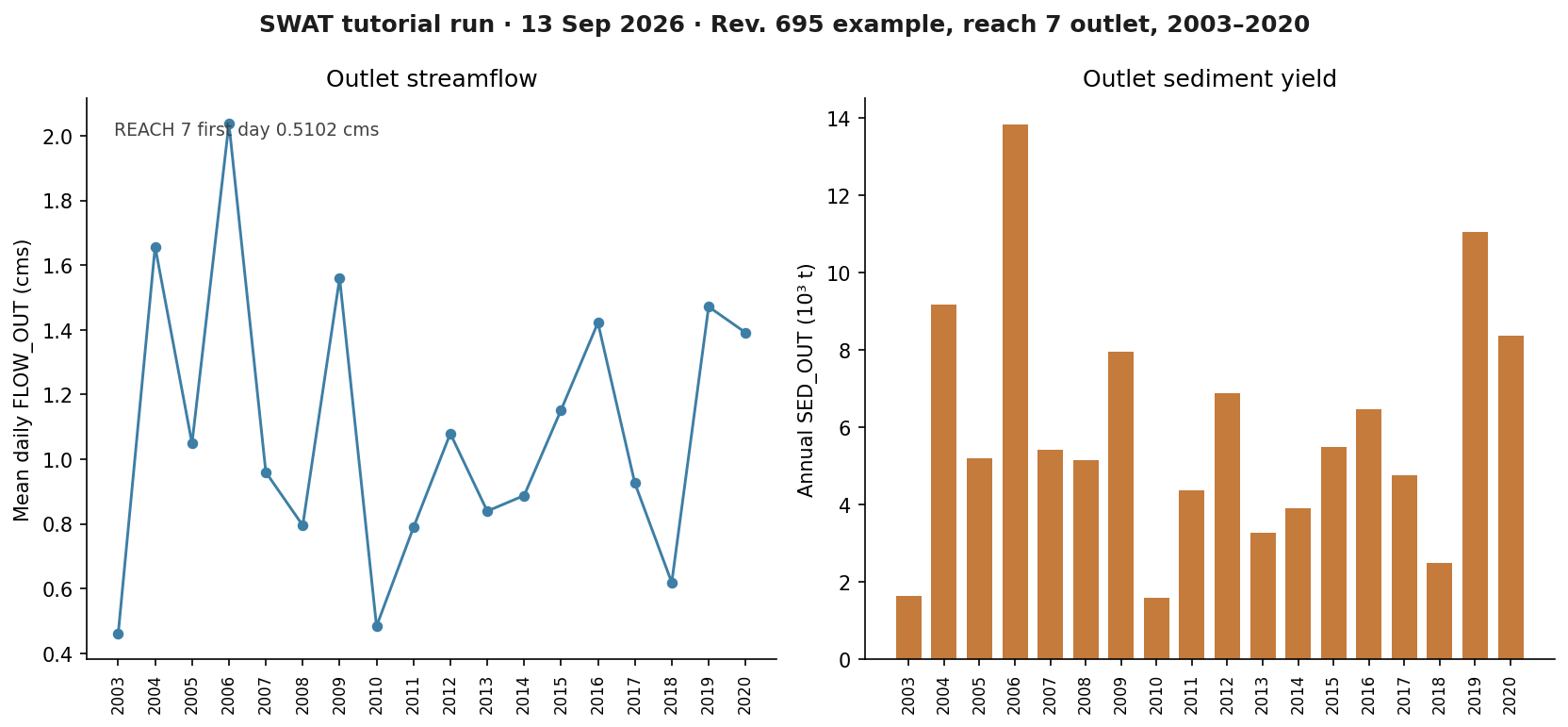
installs\SWAT\tutorial_run_20260913. Left: mean daily FLOW_OUT at reach 7. Right: annual SED_OUT at the same reach.If you rerun the wrapper after deleting output.rch in that folder, SWAT runs again and this PNG is rewritten in the run folder and in each tutorial images\ home.
Model Input and Output
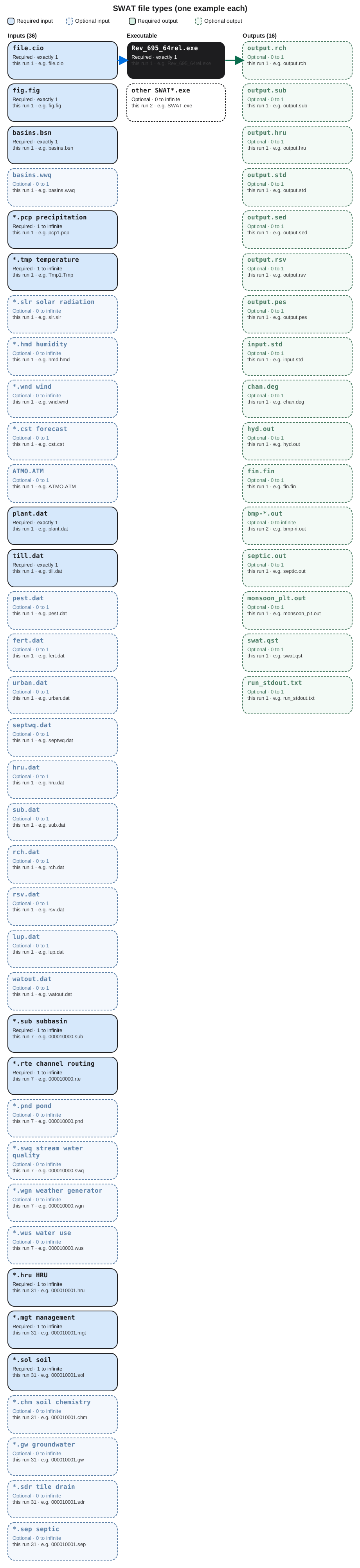
Each bubble is one file type. Solid bubbles are required (at least one must be present). Dashed bubbles are optional. Same-type files that only change location or ID are shown once, with how few and how many a run can hold.
Executable
Rev_695_64rel.exe
Required. How many: exactly 1. This run: 1. Example: Rev_695_64rel.exe.
This is the SWAT2012 revision 695 release engine. Start one copy in the TxtInOut folder. It reads file.cio and writes output.rch there. Open the example file in the verification folder to see that layout on disk.
other SWAT*.exe
Optional. How many: 0 to infinite. This run: 2. Example: SWAT.exe.
Extra SWAT binaries can sit in the example folder, including debug builds. The verified path starts only Rev_695_64rel.exe. Open the example file in the verification folder to see that layout on disk.
Input files
file.cio
Required. How many: exactly 1. This run: 1. Example: file.cio.
This is the master control file. It names weather files, databases, years, and fig.fig. One cio file per TxtInOut folder. Open the example file in the verification folder to see that layout on disk.
fig.fig
Required. How many: exactly 1. This run: 1. Example: fig.fig.
This is the watershed command file: the order of subbasins and routing so SWAT knows how land drains to the outlet. One fig file. Open the example file in the verification folder to see that layout on disk.
basins.bsn
Required. How many: exactly 1. This run: 1. Example: basins.bsn.
This is watershed-wide parameters such as runoff method and snow. One basin file for the whole project. Open the example file in the verification folder to see that layout on disk.
basins.wwq
Optional. How many: 0 to 1. This run: 1. Example: basins.wwq.
This is watershed in-stream water-quality parameters not tied to a single reach file. At most one wwq file. Open the example file in the verification folder to see that layout on disk.
*.pcp precipitation
Required. How many: 1 to infinite. This run: 1. Example: pcp1.pcp.
This is measured daily precipitation. file.cio sets how many pcp files (NRGAGE). At least one. More files if you split gauges. Open the example file in the verification folder to see that layout on disk.
*.tmp temperature
Required. How many: 1 to infinite. This run: 1. Example: Tmp1.Tmp.
This is measured daily maximum and minimum temperature. One or more tmp files, matching NTGAGE in file.cio. Open the example file in the verification folder to see that layout on disk.
*.slr solar radiation
Optional. How many: 0 to infinite. This run: 1. Example: slr.slr.
This is daily solar radiation. Usually one file named in file.cio. Additional slr files only if you split stations. Open the example file in the verification folder to see that layout on disk.
*.hmd humidity
Optional. How many: 0 to infinite. This run: 1. Example: hmd.hmd.
This is daily relative humidity. Usually one file. Evapotranspiration reads it. Open the example file in the verification folder to see that layout on disk.
*.wnd wind
Optional. How many: 0 to infinite. This run: 1. Example: wnd.wnd.
This is daily wind speed. Usually one file named in file.cio. Open the example file in the verification folder to see that layout on disk.
*.cst forecast
Optional. How many: 0 to 1. This run: 1. Example: cst.cst.
This is forecast-climate input named in file.cio. Optional. One forecast file when that option is used. Open the example file in the verification folder to see that layout on disk.
ATMO.ATM
Optional. How many: 0 to 1. This run: 1. Example: ATMO.ATM.
This is atmospheric deposition of nutrients. One deposition file when that option is on. Open the example file in the verification folder to see that layout on disk.
plant.dat
Required. How many: exactly 1. This run: 1. Example: plant.dat.
This is the plant-growth database. Every crop or cover ID in the .mgt files is defined here. One plant table. Open the example file in the verification folder to see that layout on disk.
till.dat
Required. How many: exactly 1. This run: 1. Example: till.dat.
This is the tillage database. Management operations look up mixing and residue here. One tillage table. Open the example file in the verification folder to see that layout on disk.
pest.dat
Optional. How many: 0 to 1. This run: 1. Example: pest.dat.
This is the pesticide database. One file. Management files can apply products defined here. Open the example file in the verification folder to see that layout on disk.
fert.dat
Optional. How many: 0 to 1. This run: 1. Example: fert.dat.
This is the fertilizer database. Nutrient applications in .mgt files point at these products. One fertilizer table. Open the example file in the verification folder to see that layout on disk.
urban.dat
Optional. How many: 0 to 1. This run: 1. Example: urban.dat.
This is urban land-use parameters. One urban table. Urban HRUs draw buildup and washoff from here. Open the example file in the verification folder to see that layout on disk.
septwq.dat
Optional. How many: 0 to 1. This run: 1. Example: septwq.dat.
This is septic-system water-quality parameters used with the .sep HRU files. One septic-parameter file. Open the example file in the verification folder to see that layout on disk.
hru.dat
Optional. How many: 0 to 1. This run: 1. Example: hru.dat.
This is an HRU index some interfaces write. Optional. Numbered .hru files remain the per-unit inputs. Open the example file in the verification folder to see that layout on disk.
sub.dat
Optional. How many: 0 to 1. This run: 1. Example: sub.dat.
This is a subbasin index some interfaces write. Optional. Numbered .sub files remain the subbasin inputs. Open the example file in the verification folder to see that layout on disk.
rch.dat
Optional. How many: 0 to 1. This run: 1. Example: rch.dat.
This is a reach index some interfaces write. Optional. Channel geometry still comes from numbered .rte files. Open the example file in the verification folder to see that layout on disk.
rsv.dat
Optional. How many: 0 to 1. This run: 1. Example: rsv.dat.
This is reservoir input. One file. If the example has no reservoir, it can be a stub. Open the example file in the verification folder to see that layout on disk.
lup.dat
Optional. How many: 0 to 1. This run: 1. Example: lup.dat.
This is land-use update data. One file. If land use does not change during the run, SWAT may ignore the rows. Open the example file in the verification folder to see that layout on disk.
watout.dat
Optional. How many: 0 to 1. This run: 1. Example: watout.dat.
This names watershed outlet print options. One file. The outlet reach in this example is still reach 7 in output.rch. Open the example file in the verification folder to see that layout on disk.
*.sub subbasin
Required. How many: 1 to infinite. This run: 7. Example: 000010000.sub.
This is one subbasin: area, location, and which reach it feeds. One .sub file per subbasin. A watershed needs at least one. Open the example file in the verification folder to see that layout on disk.
*.rte channel routing
Required. How many: 1 to infinite. This run: 7. Example: 000010000.rte.
This is the main channel in a subbasin: length, slope, and banks. One .rte file per subbasin that routes flow. Open the example file in the verification folder to see that layout on disk.
*.pnd pond
Optional. How many: 0 to infinite. This run: 7. Example: 000010000.pnd.
This describes ponds or wetlands in a subbasin. One .pnd per subbasin. Unused ponds are zeros, not missing types. Open the example file in the verification folder to see that layout on disk.
*.swq stream water quality
Optional. How many: 0 to infinite. This run: 7. Example: 000010000.swq.
This holds in-stream nutrient and algae parameters for a subbasin channel. One .swq per subbasin when water quality is on. Open the example file in the verification folder to see that layout on disk.
*.wgn weather generator
Optional. How many: 0 to infinite. This run: 7. Example: 000010000.wgn.
This holds monthly climate statistics for a subbasin. One .wgn per subbasin. Used to fill missing weather. Open the example file in the verification folder to see that layout on disk.
*.wus water use
Optional. How many: 0 to infinite. This run: 7. Example: 000010000.wus.
This describes irrigation or withdrawals in a subbasin. One .wus per subbasin. Unused demand still leaves a small file. Open the example file in the verification folder to see that layout on disk.
*.hru HRU
Required. How many: 1 to infinite. This run: 31. Example: 000010001.hru.
This is one hydrologic response unit: a unique mix of land use, soil, and slope. One .hru file per HRU. A run needs at least one.
*.mgt management
Required. How many: 1 to infinite. This run: 31. Example: 000010001.mgt.
This is the planting, tillage, and harvest calendar for one HRU. One .mgt file per HRU, matched to the .hru of the same ID. Open the example file in the verification folder to see that layout on disk.
*.sol soil
Required. How many: 1 to infinite. This run: 31. Example: 000010001.sol.
This is the soil profile for one HRU. One .sol file per HRU. Layer thickness and texture control infiltration and erosion. Open the example file in the verification folder to see that layout on disk.
*.chm soil chemistry
Optional. How many: 0 to infinite. This run: 31. Example: 000010001.chm.
This holds nutrient and carbon starting values for one HRU. One .chm file per HRU when nutrient cycling is simulated. Open the example file in the verification folder to see that layout on disk.
*.gw groundwater
Optional. How many: 0 to infinite. This run: 31. Example: 000010001.gw.
This sets shallow-aquifer properties for one HRU. One .gw file per HRU. It controls how water returns as baseflow. Open the example file in the verification folder to see that layout on disk.
*.sdr tile drain
Optional. How many: 0 to infinite. This run: 31. Example: 000010001.sdr.
This describes tile drainage for one HRU. One .sdr file per HRU. Unused drainage stays at defaults. Open the example file in the verification folder to see that layout on disk.
*.sep septic
Optional. How many: 0 to infinite. This run: 31. Example: 000010001.sep.
This describes on-site septic wastewater for one HRU. One .sep file per HRU. Many rural units leave defaults. Open the example file in the verification folder to see that layout on disk.
Output files
output.rch
Optional. How many: 0 to 1. This run: 1. Example: output.rch.
This is reach output. Each row is a reach and a time step. One rch file. FLOW_OUT and sediment at the outlet are what we check.
output.sub
Optional. How many: 0 to 1. This run: 1. Example: output.sub.
This is subbasin output: water and sediment generated on each subbasin. One sub file when that print is on. Open the example file in the verification folder to see that layout on disk.
output.hru
Optional. How many: 0 to 1. This run: 1. Example: output.hru.
This is HRU output: one land unit per row. One hru output file. Use it after output.rch to see which field produced the load. Open the example file in the verification folder to see that layout on disk.
output.std
Optional. How many: 0 to 1. This run: 1. Example: output.std.
This is the standard summary listing, including water-balance lines. One std file. A good second check after output.rch. Open the example file in the verification folder to see that layout on disk.
output.sed
Optional. How many: 0 to 1. This run: 1. Example: output.sed.
This is extra sediment output. One sed file. Channel sediment for the tutorial is still in output.rch. Open the example file in the verification folder to see that layout on disk.
output.rsv
Optional. How many: 0 to 1. This run: 1. Example: output.rsv.
This is reservoir output. One rsv file. Empty or header-only if no reservoir is simulated. Open the example file in the verification folder to see that layout on disk.
output.pes
Optional. How many: 0 to 1. This run: 1. Example: output.pes.
This is pesticide output. One pes file. Skip it unless management applied pesticides. Open the example file in the verification folder to see that layout on disk.
input.std
Optional. How many: 0 to 1. This run: 1. Example: input.std.
This is a listing of inputs SWAT echoes at start. One file. Use it to confirm file.cio and the databases opened. Open the example file in the verification folder to see that layout on disk.
chan.deg
Optional. How many: 0 to 1. This run: 1. Example: chan.deg.
This is channel-degradation output. One file. Extra geomorphology, not the first flow check. Open the example file in the verification folder to see that layout on disk.
hyd.out
Optional. How many: 0 to 1. This run: 1. Example: hyd.out.
This is extra hydrology output some builds write. One file. Confirm FLOW_OUT in output.rch first. Open the example file in the verification folder to see that layout on disk.
fin.fin
Optional. How many: 0 to 1. This run: 1. Example: fin.fin.
This is a finish flag SWAT writes at the end of a successful period. One file. Open the example file in the verification folder to see that layout on disk.
bmp-*.out
Optional. How many: 0 to infinite. This run: 2. Example: bmp-ri.out.
These are best-management-practice outputs, one file per BMP report the build writes. Ignore them on a first hydrology check. Open the example file in the verification folder to see that layout on disk.
septic.out
Optional. How many: 0 to 1. This run: 1. Example: septic.out.
This is septic-system output. One file. Use it only if septic loads matter. Open the example file in the verification folder to see that layout on disk.
monsoon_plt.out
Optional. How many: 0 to 1. This run: 1. Example: monsoon_plt.out.
This is a special-plot file some builds write. One file. Not required to confirm the outlet hydrograph. Open the example file in the verification folder to see that layout on disk.
swat.qst
Optional. How many: 0 to 1. This run: 1. Example: swat.qst.
This is a session file some interfaces leave behind. One file. It is not a science table. Open the example file in the verification folder to see that layout on disk.
run_stdout.txt
Optional. How many: 0 to 1. This run: 1. Example: run_stdout.txt.
This is console text captured from Rev_695_64rel.exe. One capture. Success is output.rch with the expected years. Open the example file in the verification folder to see that layout on disk.
7. After the first success
Once output.rch is written, you can open output.sub and output.hru the same way, or bring the reach file into SWAT Check. Building a new watershed is ArcSWAT or QSWAT plus SWAT Editor; that is a different lesson. This one stops at a verified CLI run of SWAT2012 Rev. 695.